
Most "hacks" are just leaked passwords.
Email is an almost entirely insecure means of communication. Messages you send can be read by any devices that they pass through on the way to their destination. Have you ever shared a password with someone via email? If you did, that password was out in the open! There are lots of other terrible ways to share passwords:
- A sheet of paper in your desk
- A shared google doc
- Just use the same password for everything
You should use a password manager like LastPass, 1Password, or BitWarden instead. Using a password manager will help you do these 3 basic things to help keep your business credentials safe:
1) Use a different and complex password for every login
2) Always share passwords securely
3) Change passwords when employees leave
Use a different and complex password for every login.
Let's say you use the same password for your Amazon, Verizon, Chase Bank, and Jim Bob's Online Auto Parts accounts. Jim Bob's website doesn't do a very good job of securing passwords and a "hacker" is able to get your password. Unfortunately the hacker now also has your Amazon, Verizon, and Chase Bank passwords. If you don't have two-factor authentication turned on they will have direct access to each of those accounts. The fact that they have your Verizon password could also be possibly used to get around two-factor auth.
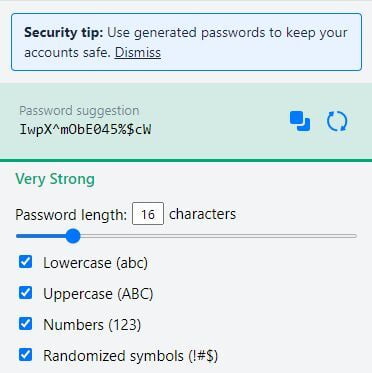
A password manager can automatically generate a different password for each account you use. If a hacker gains access to one of your passwords, they won't be able to use it in other places. Complex passwords that are longer and are more random are much more difficult for hackers to find. Here is an example of LastPass generating a password.
Always share passwords securely
When you share a password with someone you need to make sure it is encrypted while in transit to the recipient. Emails, text messages, and many chats are all un-encrypted. Password managers provide the ability to share passwords in a very secure manner. Do make sure that your critical passwords are shared with trusted team members for disaster recovery, but only share them via a password manager.
Change passwords when employees leave
When employees leave you must change any password that they had access to. Do this even if you trust them to not do anything malicious after they leave. Someone you trust could still get hacked or otherwise be forced to give up a password.
The steps to securely update credentials after an employee departure are:
1) In your password manager, revoke access to any password that was shared with the employee.
2) Change the password.
3) Update your password manager with the new password.